
Install and Activate Microsoft Office, Visio, or Project
Step 1: Download and Install
You can install your Microsoft software using either of the two methods below.
Option 1: Direct Download
Select your Office, Visio or Project version and click download:
Option 2: Download via Microsoft (setup.office.com)
- Go to setup.office.com
- Sign in with your Microsoft account
- Enter your product key when prompted
- Follow the instructions to download and install your software
Installation Instructions (for direct downloads):
- Download the
.imgor.isofile - Double-click the file to mount it
(If double-click doesn’t work, right-click and choose Mount) - Double-click
setup.exeto begin installation - Once installed, open the program
Step 2: Internet Activation
When prompted, enter your product key. If asked, sign in with your Microsoft account. Wait while the software attempts to activate online.
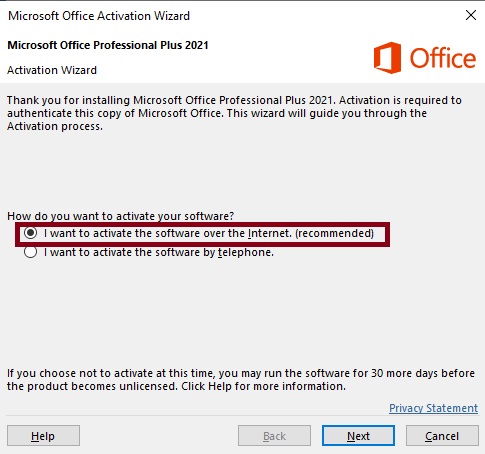
✅ If activation succeeds, you're all set!
❌ If it fails, proceed to Step 3.
❌ If it fails, proceed to Step 3.
Step 3: Telephone Activation
- Open the installed program
- Go to File → Account → Change Product Key
- Enter your product key again (if needed)
- Select Activate by telephone
- Choose your country and call the number shown
- You’ll receive an Installation ID (9 blocks of numbers)
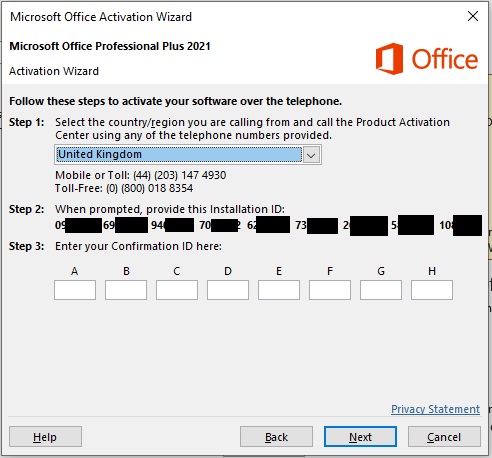
- Important: You may be given the option to receive a link via SMS or a website link. Choose this to complete activation faster.
Final Step
Enter the Confirmation ID back into the activation window to complete the process. Your software will now be fully activated and licensed for lifetime use on this device.
This key is for one PC only. If you reinstall Windows or move to another computer, phone activation may be required again.